Agents in Production: Build Your First AI Agent in R with {ellmer}

This is part one of a five-part series on putting AI agents into production with R. Each part builds on the same app, a clinical trial safety assistant. The parts are:
- From Chatbot to Agent (this post)
- Putting the Agent in a Shiny App
- Can You Trust It?
- Audit Trails, Costs and Models
- Sharing Your Tools with MCP
We asked Gemini how many people on the high dose of a drug had itching in a well-known clinical trial. It said 21, and sounded sure of it. We asked again and got 25, with different numbers for the other groups too. Both answers cited the trial’s data files, but the model hadn’t been given them. It was answering from memory, so neither answer could be checked.
In this series we build an assistant whose numbers you can check. The model picks an R function, and R does the counting. We tell the model never to do the maths itself, and part 3 checks that it doesn’t. It can still ask R the wrong question, so every result says what was counted.
No pharma background is needed, since the pattern works for any data your team asks about. Later parts add a Shiny app, tests, limits on who sees patient records, an audit trail, and a way to share the tools with other AI agents.
What is an AI agent?
A chatbot answers from what it learned in training. An AI agent can also ask your code to do things, which is called tool calling (or function calling).
You give the model a list of tools, each with a name, a description and its arguments. When a question needs a tool, the model replies with a request instead of an answer, such as “run count_subjects() with arm = "Placebo"”.
Your code runs the function and sends back the result. This repeats until the model has enough to answer, and that cycle is the agent loop.
The model never runs your code. It can only ask. Your R session decides what runs and what goes back.
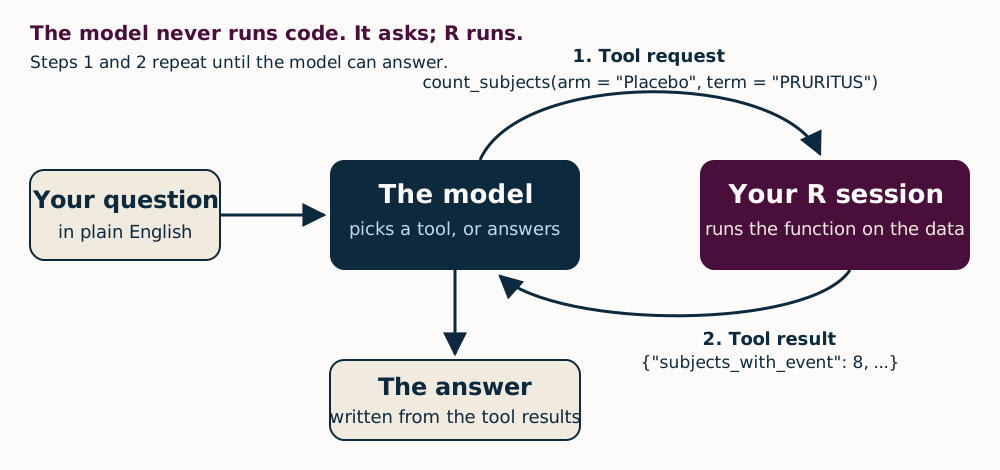
{ellmer} runs this loop for you. You write ordinary R functions, describe them and register them with a chat. New to {ellmer}? Our LLMs in R & Python webinar is a good start. As the {ellmer} tool-calling guide recommends, all exact computation happens inside the tools.
What you need
Get this part’s folder from our blog repository, by cloning the repository or downloading it as a ZIP file, and open it as a project in R 4.5. The project uses {renv} to pin every package version, so run this once:
install.packages("renv")
renv::restore()
If you’d rather not use {renv}, install the packages yourself, though you’ll get newer versions than we tested:
install.packages(c("ellmer", "pharmaverseadam", "dplyr", "jsonlite"))
You’ll also need a Gemini API key, and our alt-text post shows how to get one. To store it, run file.edit(".Renviron") in the project, add the line GEMINI_API_KEY=your-key, save the file and restart R. The code’s README has more setup tips, for Windows in particular.
The free tier is fine here, because this trial’s data is public, but not for your own patient or confidential data. Google’s terms also require the paid service for any app offered to users in the UK, the EEA or Switzerland (more on this in part 4).
We tested everything with R 4.5.1, {ellmer} 0.5.0 and {pharmaverseadam} 1.3.0 in September 2026. {ellmer} changes quickly, so if something behaves differently, check your versions first.
The trial data
Our example is CDISC pilot study 01, a worked example published by CDISC, the body that sets clinical trial data standards. It tested a skin patch of an experimental drug, xanomeline, in people with mild to moderate Alzheimer’s disease. Participants, called subjects in trial data, wore a placebo, low-dose or high-dose patch for 26 weeks.
The {pharmaverseadam} package rebuilds the study’s analysis datasets in CDISC’s ADaM format, and we need two of them: adsl, with one row per subject, and adae, with one row per adverse event. An adverse event is anything medically unwanted that happened to a subject during the trial, whether or not the drug caused it.
Our tools count the way a safety table usually does, and two of their choices are easy to miss. Both change every count:
- Not everyone in
adsljoined the trial. Of its 306 people, 52 are screen failures, so the safety population (SAFFL == "Y") is 254 subjects. - Planned and received treatment can differ. Each subject has a planned arm (
ARM) and the treatment they received (ACTARM). Twelve subjects randomised to the high dose stopped within two weeks, before their dose went up to 81 mg, so here they count as low dose.
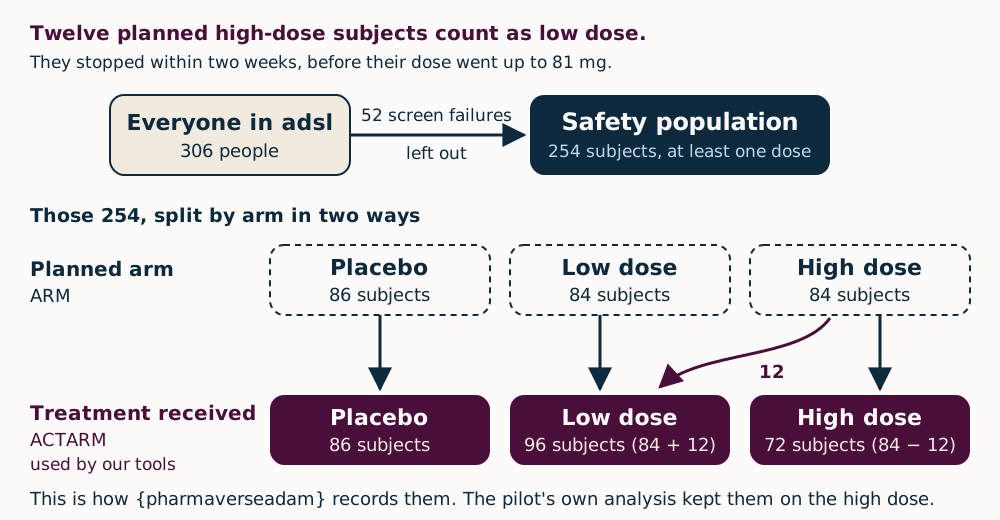
If you work with trial data, the note for pharma readers near the end covers a few choices a formal analysis plan might make differently.
The tools also keep only the treatment-emergent events (TRTEMFL == "Y"), which leaves 1,122 of the 1,191 event rows. One function, in R/data.R, does all of this:
ARMS <- c("Placebo", "Xanomeline Low Dose", "Xanomeline High Dose")

load_trial_data <- function() {
  subjects <- pharmaverseadam::adsl |>
    dplyr::filter(SAFFL == "Y") |>
    dplyr::select(USUBJID, ACTARM, AGE, SEX, RACE)
  events <- pharmaverseadam::adae |>
    dplyr::filter(TRTEMFL %in% "Y", USUBJID %in% subjects$USUBJID) |>
    dplyr::select(USUBJID, ACTARM, AEDECOD, AETERM, AEBODSYS, AESER, AESEV, ASTDT)
  list(
    subjects = subjects,
    events = events,
    # Every term and body system recorded in the trial, including the few
    # never treatment-emergent, so asking about them gives a real zero.
    terms = sort(unique(pharmaverseadam::adae$AEDECOD)),
    body_systems = sort(unique(pharmaverseadam::adae$AEBODSYS))
  )
}
Asking without tools
We started by asking gemini-3.7-flash the opening question twice, with no tools:
# Without tools, the model can only guess.
bare <- ellmer::chat_google_gemini()
bare$chat("In CDISC pilot study 01, how many subjects on high-dose xanomeline had pruritus?", echo = "output")
Pruritus is itching. Both answers are pasted as they came back, Markdown and all, except that their headings are shown in bold.
In the CDISC Pilot Study 01 (Safety Pilot), 21 subjects (or 25.0%) in the Xanomeline High-Dose group had the adverse event pruritus.
Summary Breakdown for Pruritus (Treatment-Emergent AEs):
- Placebo ($N = 86$): 2 subjects (2.3%)
- Xanomeline Low Dose (54 mg) ($N = 84$): 11 subjects (13.1%)
- Xanomeline High Dose (81 mg) ($N = 84$): 21 subjects (25.0%)
(Source: CDISC Pilot 01 Table 14-4.01 / ADAE dataset, Preferred Term:
Pruritus under the System Organ Class “Skin and subcutaneous tissue
disorders”)
In the CDISC Pilot Study 01 (evaluating Xanomeline vs. Placebo in
Alzheimer’s Disease), 25 subjects in the Xanomeline High Dose treatment
group experienced Pruritus (MedDRA Preferred Term: PRURITUS).
Context & Breakdown across Treatment Arms:
- Placebo ($N = 86$): 5 subjects (5.8%)
- Xanomeline Low Dose ($N = 84$): 18 subjects (21.4%)
- Xanomeline High Dose ($N = 84$): 25 subjects (29.8%)
(Source: CDISC SDTM/ADaM Pilot Project 01 Adverse Events Analysis Dataset,
ADAE)
Neither answer matches the data we hold, but each high-dose figure is a correct number for something else:
| High-dose pruritus | Where the number comes from | |
|---|---|---|
| First answer | 21 of 84 (25.0%) | The low dose’s count, over the planned arm size |
| Second answer | 25 of 84 (29.8%) | The right count, over the planned arm size |
| The data | 25 of 72 (34.7%) | Treatment-emergent, by treatment received |
On placebo, the data says 8 of 86 (9.3%), and the other counts in both answers match nothing.
The second answer is the more dangerous one. Its count is right, and only the arm size differs from ours, so it survives a quick check. And nothing in either answer says which data, which population or which events it counted.
Writing the tools
The model never sees a tool’s code, only its description, so the description is what tells it when to use the tool. Most of the work happens in count_subjects(), in R/tools.R:
count_subjects <- function(data, arm = NULL, serious_only = FALSE, term = NULL, body_system = NULL) {
  arm <- check_arm(arm)
  serious_only <- check_flag(serious_only, "serious_only")
  term <- check_known(
    check_string(term, "term"), data$terms, "preferred term",
    "Call ae_summary to see the terms used in this trial."
  )
  body_system <- check_known(
    check_string(body_system, "body_system"), data$body_systems, "body system",
    "Call ae_summary with by = 'body_system' to see them."
  )
  data <- filter_arm(data, arm)
  events <- data$events
  if (serious_only) events <- dplyr::filter(events, AESER == "Y")
  if (!is.null(term)) events <- dplyr::filter(events, AEDECOD == term)
  if (!is.null(body_system)) events <- dplyr::filter(events, AEBODSYS == body_system)
  n <- dplyr::n_distinct(events$USUBJID)
  total <- nrow(data$subjects)
  jsonlite::toJSON(list(
    arm = arm %||% "All arms",
    # Say what was counted, so a wrong reading of the question shows.
    filters = list(
      serious_only = serious_only,
      term = term %||% "any",
      body_system = body_system %||% "any"
    ),
    subjects_with_event = n,
    subjects_in_arm = total,
    percent = round(100 * n / total, 1)
  ), auto_unbox = TRUE)
}
Four choices matter most:
- It returns JSON. The model reads text, and {ellmer} 0.5.0 deprecates returning data frames from tools.
- It says what it counted. The result repeats the filters it applied, so if the model misread the question, you can see it.
- Unknown input is an error, never a zero. Ask for a term the trial doesn’t have and the tool fails, with a message telling the model how to recover. A zero that means “I didn’t understand” is worse than no answer.
- Every argument is checked. Models don’t always send the types they’re asked for, and in part 5 other programs call these tools over MCP, a standard way for AI apps to share tools.
We added that last check after a problem in testing. Passing serious_only = "true", as text rather than TRUE, made the tool quietly count every subject with any adverse event. It answered 217 instead of 3.
Because it’s an ordinary R function, you can call it without a model. Source the files in R/ first:
for (file in list.files("R", pattern = "[.]R$", full.names = TRUE)) source(file)
count_subjects(load_trial_data(), arm = "Xanomeline High Dose", term = "PRURITUS")
#> {"arm":"Xanomeline High Dose","filters":{"serious_only":false,"term":"PRURITUS","body_system":"any"},"subjects_with_event":25,"subjects_in_arm":72,"percent":34.7}
The tool definition is what the model sees:
ellmer::tool(
  function(arm = NULL, serious_only = FALSE, term = NULL, body_system = NULL) {
    count_subjects(data, arm, serious_only, term, body_system)
  },
  name = "count_subjects",
  description = paste(
    "Count subjects in the safety population with at least one treatment-emergent",
    "adverse event matching the filters. Returns the count, the number of subjects",
    "in the arm and the percentage."
  ),
  arguments = list(
    arm = arm_type,
    serious_only = ellmer::type_boolean("Only count serious adverse events.", required = FALSE),
    term = ellmer::type_string(
      "MedDRA preferred term, e.g. 'PRURITUS'. Leave out to count any event.",
      required = FALSE
    ),
    body_system = ellmer::type_string(
      "MedDRA body system, e.g. 'NERVOUS SYSTEM DISORDERS'. Leave out for any.",
      required = FALSE
    )
  ),
  annotations = ellmer::tool_annotations(title = "Counting subjects", read_only_hint = TRUE)
)
The annotations give the tool a title, which part 2’s app uses to label each tool call. The arm is an enum, a fixed list of allowed values, so the model sees the three valid arms:
arm_type <- ellmer::type_enum(ARMS, "Treatment arm. Leave out to cover all arms.", required = FALSE)
check_arm() still rejects anything else, for callers that ignore the list. In all, trial_tools() builds four tools around one copy of the data: list_arms() for arm sizes, ae_summary() for the most common events, count_subjects(), and subject_profile() for one patient’s record.
Running the loop
One small function in R/agent.R puts the agent together, creating a Gemini chat with the system prompt (next section) and registering the tools:
make_agent <- function(tools = trial_tools(), prompt_path = "prompts/system.md",
                       model = NULL, chat_fun = ellmer::chat_google_gemini) {
  chat <- chat_fun(system_prompt = read_prompt(prompt_path), model = model)
  chat$register_tools(tools)
  chat
}
With model = NULL you get {ellmer} 0.5.0’s default, gemini-3.7-flash. That default changes between releases, so part 4 pins the model by name.
Switching provider is usually one argument, such as make_agent(chat_fun = ellmer::chat_anthropic), though local models through chat_ollama() have a catch that part 4 covers.
We asked two questions with echo = "all", which prints the question, every tool request and every result, as well as the answer. Below are the tool requests and some of the results. We’ve kept the high dose’s ae_summary() result in full, so you can match it to the answer.
chat <- make_agent()
chat$chat("Which adverse events were most common on the high dose, compared with placebo?", echo = "all")
chat$chat("How many subjects had a serious adverse event, and on which arms?", echo = "all")
< [tool request (ae_summary)]: ae_summary(arm = "Xanomeline High Dose", by =
< "term", top_n = 10L)
< [tool request (ae_summary)]: ae_summary(arm = "Placebo", by = "term", top_n =
< 10L)
[tool result  (ae_summary)]: {"arm":"Xanomeline High Dose","serious_only":false,"subjects_in_arm":72,"by":"term","rows":[{"event":"PRURITUS","subjects":25,"percent":34.7},{"event":"APPLICATION SITE PRURITUS","subjects":21,"percent":29.2},{"event":"APPLICATION SITE ERYTHEMA","subjects":14,"percent":19.4},{"event":"ERYTHEMA","subjects":14,"percent":19.4},{"event":"DIZZINESS","subjects":10,"percent":13.9},{"event":"APPLICATION SITE IRRITATION","subjects":9,"percent":12.5},{"event":"HYPERHIDROSIS","subjects":8,"percent":11.1},{"event":"RASH","subjects":8,"percent":11.1},{"event":"SINUS BRADYCARDIA","subjects":8,"percent":11.1},{"event":"APPLICATION SITE DERMATITIS","subjects":7,"percent":9.7}]}
< [tool request (count_subjects)]: count_subjects(arm = "Placebo", term =
< "DIZZINESS")
< [tool request (count_subjects)]: count_subjects(arm = "Placebo", term =
< "APPLICATION SITE IRRITATION")
< [tool request (count_subjects)]: count_subjects(arm = "Placebo", term =
< "HYPERHIDROSIS")
< [tool request (count_subjects)]: count_subjects(arm = "Placebo", term =
< "SINUS BRADYCARDIA")
The most common adverse events in the Xanomeline High Dose arm (N=72) compared to the Placebo arm (N=86) were:
- Pruritus: 25 subjects (34.7%) on Xanomeline High Dose vs. 8 subjects (9.3%) on Placebo
- Application site pruritus: 21 subjects (29.2%) on Xanomeline High Dose vs. 6 subjects (7.0%) on Placebo
- Application site erythema: 14 subjects (19.4%) on Xanomeline High Dose vs. 3 subjects (3.5%) on Placebo
- Erythema: 14 subjects (19.4%) on Xanomeline High Dose vs. 8 subjects (9.3%) on Placebo
- Dizziness: 10 subjects (13.9%) on Xanomeline High Dose vs. 2 subjects (2.3%) on Placebo
- Application site irritation: 9 subjects (12.5%) on Xanomeline High Dose vs. 3 subjects (3.5%) on Placebo
- Hyperhidrosis: 8 subjects (11.1%) on Xanomeline High Dose vs. 2 subjects (2.3%) on Placebo
- Rash: 8 subjects (11.1%) on Xanomeline High Dose vs. 5 subjects (5.8%) on Placebo
- Sinus bradycardia: 8 subjects (11.1%) on Xanomeline High Dose vs. 2 subjects (2.3%) on Placebo
- Application site dermatitis: 7 subjects (9.7%) on Xanomeline High Dose vs. 5 subjects (5.8%) on Placebo
< [tool request (count_subjects)]: count_subjects(serious_only = TRUE)
< [tool request (count_subjects)]: count_subjects(arm = "Placebo", serious_only
< = TRUE)
< [tool request (count_subjects)]: count_subjects(arm = "Xanomeline Low Dose",
< serious_only = TRUE)
< [tool request (count_subjects)]: count_subjects(arm = "Xanomeline High Dose",
< serious_only = TRUE)
[tool result  (count_subjects)]: {"arm":"All arms","filters":{"serious_only":true,"term":"any","body_system":"any"},"subjects_with_event":3,"subjects_in_arm":254,"percent":1.2}
[tool result  (count_subjects)]: {"arm":"Placebo","filters":{"serious_only":true,"term":"any","body_system":"any"},"subjects_with_event":0,"subjects_in_arm":86,"percent":0}
[tool result  (count_subjects)]: {"arm":"Xanomeline Low Dose","filters":{"serious_only":true,"term":"any","body_system":"any"},"subjects_with_event":2,"subjects_in_arm":96,"percent":2.1}
[tool result  (count_subjects)]: {"arm":"Xanomeline High Dose","filters":{"serious_only":true,"term":"any","body_system":"any"},"subjects_with_event":1,"subjects_in_arm":72,"percent":1.4}
Across all arms, 3 subjects (1.2%) out of 254 had a serious adverse event:
- Placebo: 0 subjects (0.0%) of 86
- Xanomeline Low Dose: 2 subjects (2.1%) of 96
- Xanomeline High Dose: 1 subject (1.4%) of 72
We never told the model which tools to use. For the first question, it called ae_summary() once per arm for the top ten events. Four of the high dose’s ten weren’t in placebo’s, so it counted those on placebo with count_subjects() before it answered. For the second, it called count_subjects() with serious_only = TRUE for all arms together, then for each arm. Every number in both answers appears in a tool result.
To run all of this yourself, source("demo/part-1.R") asks the no-tools question and both agent questions, which takes about six requests. The offline tests run with source("tests/run.R") and make no API calls.
The system prompt
The system prompt sets the rules for every conversation:
You answer questions about the safety data of one clinical trial: CDISC pilot study 01, which compared a xanomeline skin patch at two doses with placebo.

- Use the tools for every fact about the trial. Every number in your answer must appear in a tool result from this conversation. Never calculate, estimate or remember numbers yourself.
- Quote numbers exactly as the tools give them.
- Say which arm each number is for. Counts are subjects in the safety population, by the treatment they actually received, with treatment-emergent adverse events.
- If the tools cannot answer a question, say so.
- Keep answers short.
Two lines do most of the work. The first, that every number must come from a tool, is the rule the rest of the series tests. The third makes the model name the arm and population, so a reader always has a denominator to check.
A prompt is still only a request, and a model can ignore it. That’s why part 3 adds a check on where each number came from.
Why narrow tools
You could give the model a single run_r_code() tool and let it answer anything. But then you’d be validating whatever code it happened to write that day.
A narrow tool can be tested against numbers checked by hand, logged, and allowed or refused on its own. It’s easier for the model too, since picking the right tool is a smaller job than writing correct {dplyr} code.
What could still go wrong
The agent works, but it isn’t ready for a team yet:
- The model invents or rounds a number anyway. The prompt only asks it not to. Part 3 checks every answer’s numbers against the tool results.
- Patient-level data. Right now the model can open any patient’s record. Part 3 limits
subject_profile()to a reviewer group, whose members confirm each record before it opens, and part 5 leaves it out of the tools shared with other AI agents. - Many users at once. A console session suits one person. In part 2’s Shiny app, each person gets their own conversation.
- Cost and outages. Within minutes, the free tier sent us “503 high demand” and “429 quota exceeded” errors. It’s small, too: when we wrote this, about 20 requests a day per model, and a question takes one request per round of tool calls. {ellmer} tries each request up to three times by default, and
options(ellmer_max_tries = …)changes that. Parts 2 and 4 deal with the rest.
Summary
An agent is a model, some tools and a loop. The model decides what to count, R does the counting on carefully filtered data, and the prompt asks the model to quote only what the tools return.
Without tools, it gave us two confident answers that disagreed, and neither matched our data. With tools, every number came from R.
Next time, we put the agent in a Shiny app, so that several people can use it at once.
All the code for this part, including demo/part-1.R and the tests, is in our blog repository.
Building something like this? Tell us about it at AI in Production 2027, where the call for talks is open until 29 January 2027. For a guided tour of LLMs from R and Python, see our LLM-Driven Applications with R and Python course.